
On her last day, the office manager who set up your door system gets a simple question: who else can add a badge? Nobody knows. She created the account, it’s tied to her email, and the installer’s number is in her phone.
Your business paid for every reader, lock, and controller in the building. That turns out to be a different thing from controlling them. This post covers what your access control data actually is, the moments when ownership gets tested, and the questions to get answered in writing, whichever arrangement you have.
What “access control data” actually is
When people talk about access control data, they usually mean four things.
- The people list. Everyone who has a card, fob, code, or phone credential, and which one they have. If your doors read fingerprints or faces, those records are on the list too.
- The rules. Which doors each person can open, at which hours, based on which role.
- The door history. Every door opened, every badge turned away, every door forced or propped open. After a theft or an HR dispute, it’s the first thing anyone asks for.
- The admin login. The account that can change everything above.
Owning the doors isn’t the same as controlling them
Every reader, lock, and controller is hardware you can touch. Control lives in two places you can’t: the admin account and the software license. Whoever holds those decides who gets in.
There are two common arrangements. In one, your business holds the admin account and calls the installer when it needs help. In the other, the installer holds the account and manages the system for you, usually as part of a service agreement. Both arrangements are common. What matters is that you know which one you have, and what happens to your doors and your data if you leave.
The hardware plays a part too. Some readers and controllers work with only one company’s software. Others follow open, published standards and work with several. If yours are the first kind, changing software can mean changing hardware.
Whether the software runs in the cloud or on a server in your building doesn’t settle any of this. Our guide to access control systems for business covers that choice. Either way, the ownership question is the same: whose name is on the account, and what can you take with you?
Four moments that test who’s in control
None of these is an emergency. Each one happens on an ordinary business day.
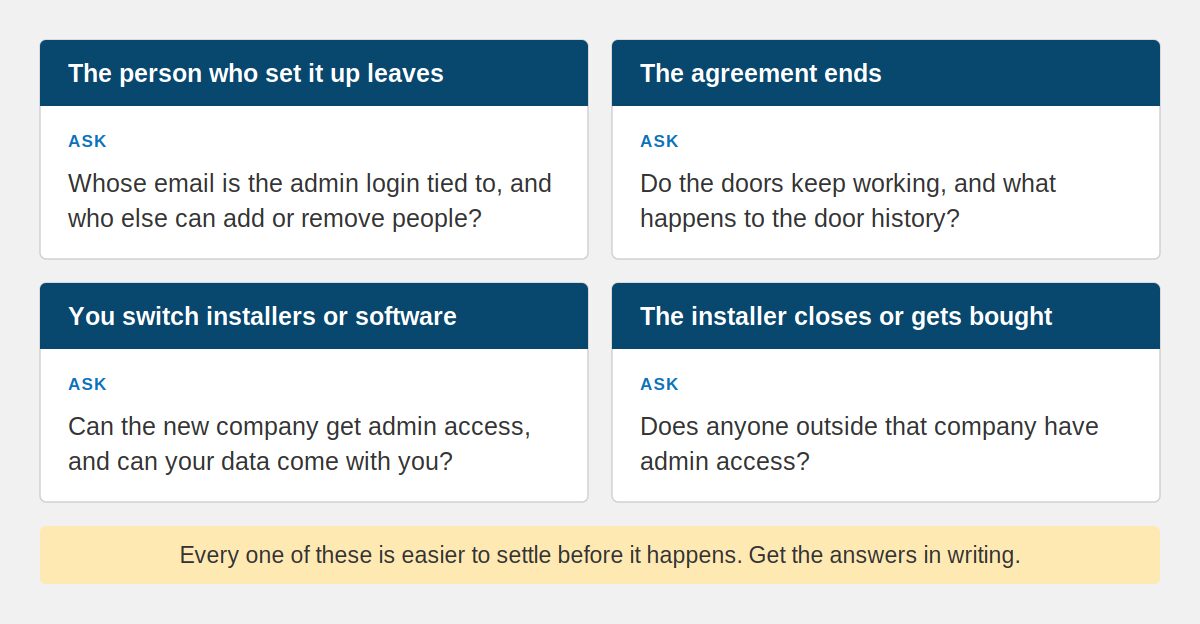
Ownership rarely comes up while everything works. It comes up at one of four moments.
The person who set it up leaves. If the admin login is tied to their email, their departure can lock you out of your own system. Before they go, find out who else can add and remove people, and take away their admin access the day they leave.
The agreement ends. You stop paying for the subscription or the service contract. Do the doors keep working? Can you still add a new hire or remove someone who quit? What happens to the door history?
You switch installers or software. The new company needs admin access to take over. Can you give it to them? Can you bring the people list, the rules, and the history with you, or does everyone get entered again by hand? Will the existing readers and controllers work with the new software?
The installer closes or gets bought. Who do you call when a door won’t unlock? Does anyone outside that company have admin access?
There’s a quieter version of the problem, too. The installer assumes your IT provider has the admin details. Your IT provider assumes the installer does. If you pay for managed IT services, ask whether the door system’s accounts, and any server it runs on, are on their list. It’s the same pattern that causes trouble everywhere in building technology: work handed from one company to the next until nobody knows who holds the keys.
Questions to get answered in writing
You don’t need to decide which arrangement is best. You need the answers on paper before the day you need them. A systems integrator responsible for the whole install should be able to answer every one of these without checking with someone else.
- Whose name is on the account with the software company: ours or yours?
- Will we have our own admin login, and who else has one?
- If we end our agreement with you, what keeps working, and for how long?
- Can we export our people list, door schedules, and door history? In what form?
- Will these readers and controllers work with another company’s software?
- How long is door history kept, and can we change that?
If an answer is vague, ask again before you sign. These questions only get harder to settle once the system is on the doors.
Frequently asked questions
Who owns the data in a cloud-based access control system?
The agreement decides, not the technology. In a cloud-based access control system, the software company stores the data, and whoever holds the admin account controls it day to day. What you can export, and what happens to your door history if you leave, is set by the contract. Ask for those terms in writing before you sign.
What happens to my access control system if I stop paying for it?
It depends on the system and the agreement. Depending on the terms, the doors may keep working while you lose the ability to add or remove people, make changes remotely, or reach the door history. There’s no standard answer, which is why it belongs in writing before installation rather than after the last invoice.
Can I switch access control installers without replacing the hardware?
Sometimes. It depends on two things: whether your readers and controllers follow open, published standards or work with only one company’s software, and whether you can hand the new installer admin access and your data. Both are easier to settle before the system goes in than after, so ask about them while you’re comparing quotes.
What should we do when the person who manages our access control leaves?
Before they go, confirm who else has admin access and can add or remove people. Remove their admin access the day they leave, and change the account’s contact email if it was theirs. If your installer holds the account, tell them who your new contact is, so requests from the right person still get answered.
Start with the system you already have
If you already have access control, try these questions on your current system. If nobody at your business can answer the first one, that’s worth knowing now rather than on someone’s last day.
Bestegra designs, implements, and supports access control as part of its physical security and life safety work, and the crew running cable and installing devices works for Bestegra. If you’re not sure who holds the keys to your current system, that’s a good place to start the conversation. Get in touch.