

Most businesses go looking for managed IT services at one of three moments. The person who “handles the computers” just gave notice, and it turns out they were handling a lot more than computers. Something broke expensively — a server, an email system, a week of somebody’s files — and the repair bill came with no plan for next time. Or the company simply grew past the point where IT can be somebody’s side job.
Then the sales calls start, and every provider says roughly the same words: proactive monitoring, cybersecurity, cloud, support. This guide is the translation. It covers what managed IT services actually include, how they’re priced, what changes when you’re a small business, and — the part the sales pages skip — how to find out who will actually be doing the work.
What managed IT services actually are
Managed IT services means handing the ongoing care of your technology to an outside company — called a managed service provider, or MSP — for a flat recurring fee. The MSP keeps your systems running, watches for problems, applies updates, supports your people when something won’t work, and takes responsibility for the result.
The important word is ongoing. This is the opposite of the older arrangement, usually called break-fix, where you call somebody when something is already broken and pay by the hour while they fix it. Under break-fix, the provider makes money when your systems fail. Under a managed agreement, the provider makes money when they don’t — the fee is flat, so every problem they prevent is a problem they don’t have to pay someone to fix. That reversal of incentives, more than any particular technology, is what you’re buying.
What’s included (and what’s an add-on)
No two providers bundle exactly the same things, which is why two quotes for “managed IT” are rarely quotes for the same service. The core of most agreements looks like this:
- Help desk and user support. Your people call or email when something won’t work — a password, a printer, a file that vanished — and someone fixes it. Ask where the help desk is and who staffs it; the answer varies more than you’d think.
- Monitoring and maintenance. Software watches your servers, computers, and network around the clock and flags trouble early. Updates and security patches get applied on a schedule instead of whenever someone remembers.
- Security basics. Protection on every computer, backups that someone actually tests, and filtering that catches the worst of what arrives by email. This is the floor, not the ceiling — deeper security work is usually a tier up or an add-on.
- Cloud and email management. Administering your email and office platforms, your file storage, and whatever your business runs on — accounts, licenses, access when people join and leave.
- Vendor management. When the internet provider, the phone company, and the software vendor all insist the problem is someone else’s, the MSP owns the argument so you don’t.
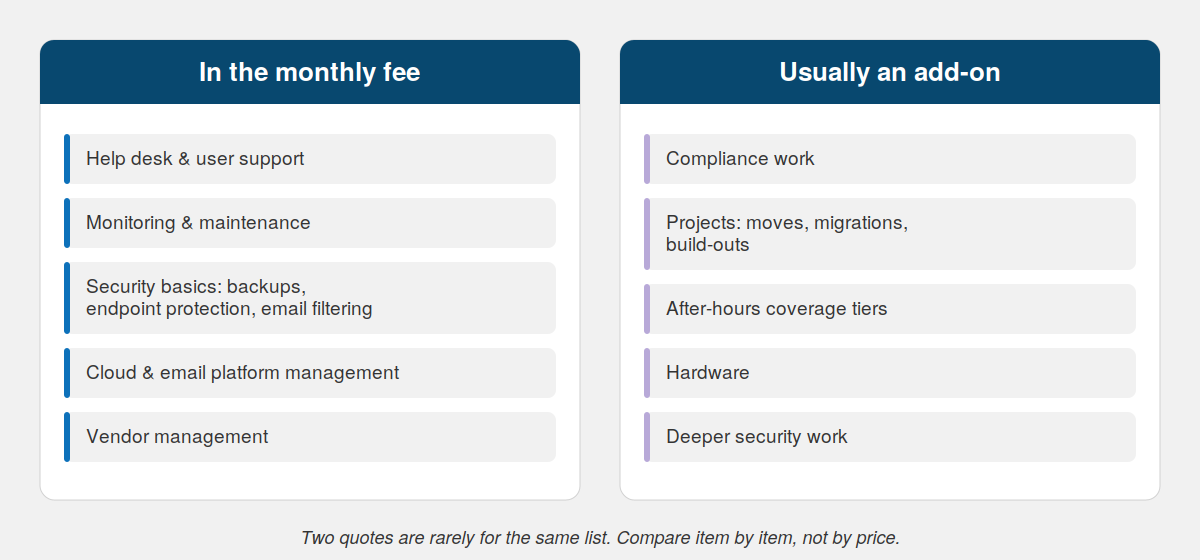
The bundles vary by provider. When two quotes differ in price, this list is usually why.
Then there’s the layer that’s usually extra: compliance work for regulated industries, projects like office moves and migrations, after-hours coverage beyond a standard tier, and hardware. When you compare quotes, compare them line by line — the cheaper one is usually cheaper because something on this list quietly moved from “included” to “billable.”
How managed IT is priced
Ignore the numbers you find online and look at the models, because the model tells you how the relationship will work.
Per user, per month is the most common: one price for each person, covering their devices and support. It scales with headcount, which makes budgeting simple. Per device counts computers and servers instead of people. Tiered plans wrap either model in packages — the difference between tiers is usually security depth, response commitments, and what counts as a project.
What actually moves the price: how many people you have, how much runs on servers or in the cloud, your security and compliance obligations, how fast you need a response when something breaks, and whether projects are inside the fee or billed separately. The pattern worth knowing: the entry-level tier is usually priced to win the comparison, and the thing your business needs first is usually in the next tier up. Read the exclusions before the price.
Managed IT services for small business: what actually changes
Managed IT services for small business isn’t a smaller portion of the same meal. A larger company hires an MSP to extend an IT department it already has. A twenty-person company is hiring the entire department — there’s no internal IT person to catch what the MSP misses, coordinate vendors, or notice that backups stopped running in March.
That changes what you should expect from a provider:
- A named contact, not just a ticket queue. Someone who knows your business and answers for the relationship.
- Onboarding and offboarding that keeps pace with hiring. When someone starts Monday, their accounts, computer, and access exist Monday. When someone leaves, access ends the day they do — the same reason you turn off a departed person’s badge in access control systems for business, applied to everything else they could log into.
- Security sized to your actual obligations. Insurance carriers increasingly ask small businesses pointed questions about backups, access, and training. Your MSP should be able to answer them with you.
- A provider who will say “you don’t need that yet.” The right answer for a small business is sometimes less. A provider who only ever recommends more is telling you how they make money.
It’s a familiar arc for growing businesses in the Denver area: the company that ran fine on a shared drive and a capable office manager crosses thirty people, and suddenly nobody knows who owns IT. That’s the moment this model exists for.
Co-managed IT: when you already have an IT person
There’s a middle arrangement that most explainers skip. Co-managed IT means your internal IT person or team keeps part of the job and an MSP takes the rest — usually the around-the-clock monitoring, the security tooling, the after-hours coverage, or simply the overflow one person can’t absorb.
It works well when you have one good IT person drowning in tickets who never gets to the important work. It fails the same way every split arrangement fails: two parties, each assuming the other one owns a thing, and the thing sits unowned until it breaks. If you go co-managed, the division of responsibility goes in writing — not “we’ll coordinate,” but who owns backups, who owns security alerts, who owns the network. By name.
The part most MSPs don’t manage: the building your IT runs on
Here’s the limitation that never appears on an MSP’s website. A remote provider manages what it can reach over the internet: your cloud services, your servers, the software on your computers. But your IT doesn’t live on the internet. It lives in your building — in switches mounted in a closet, in structured cabling run through the walls, in wireless coverage that has to pass through real floors and real concrete, and increasingly in cameras and door controllers riding the same network as everything else.
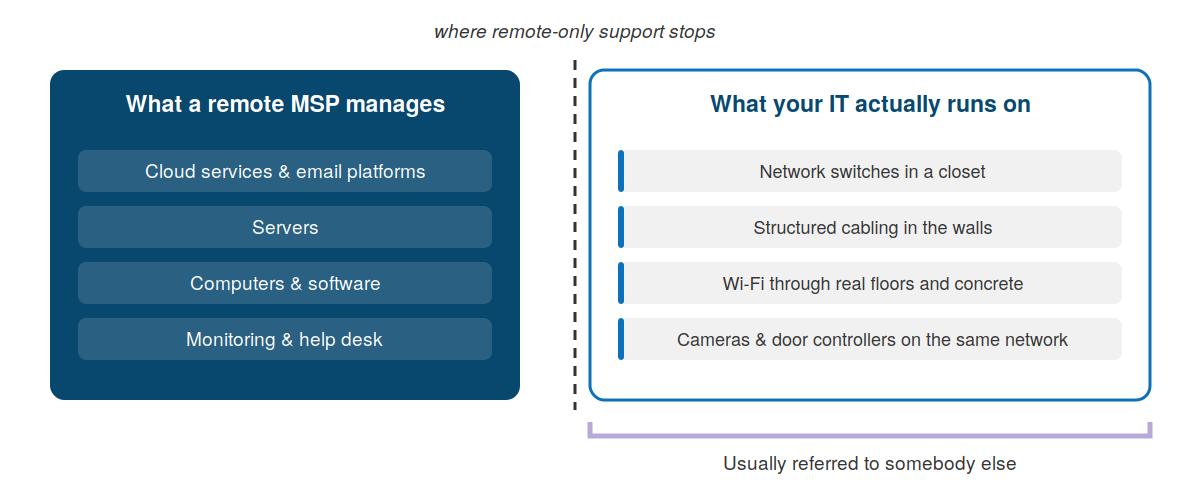
Everything on the right is still your IT. It’s just nobody’s contract.
When the MSP is remote-only, every physical problem becomes a hand-off. The Wi-Fi is unusable in half the warehouse: the MSP checks the settings remotely and says the equipment is fine. A cabling contractor comes out, tests the runs, and says the cable is fine. The camera system drops offline every afternoon: the security vendor says it’s a network problem, the MSP says it’s a camera problem. Each company is right about its piece, you’re paying all of them, and the problem is still there — because the problem lives in the seams, and nobody was hired to own the seams.
This is the same chain of hand-offs that breaks security projects, and the fix is the same: fewer companies, more responsibility per company. When the provider managing your network also designed the cabling it runs on and installed the devices hanging off it, “whose problem is this” stops being a question. That’s the difference between buying IT in a silo and buying it as part of the building’s whole nervous system.
In-house, break-fix, or managed: which one fits
Honest triage, because managed isn’t the answer for everyone.
Break-fix still makes sense when downtime is an annoyance rather than a cost — a few computers, nothing regulated, nothing that stops revenue when it stops working. You’re gambling that repairs stay cheaper than a monthly fee, and at a small enough scale, that’s often a fair bet.
In-house IT makes sense at a scale most small businesses never reach — enough daily work to fill a skilled person’s week, every week, plus coverage for their vacations, plus a plan for when they resign.
Managed fits when the signs pile up: downtime now costs real money by the hour. Nobody owns IT, and it shows. You’re hiring, and every new person waits days for accounts and a computer. Your insurance renewal asked security questions nobody could answer. Or the one person who knows how everything works is a single resignation away from taking that knowledge with them.
Questions to ask before you sign with an MSP
You don’t need to evaluate the technology. You need to find out how the provider is built, because that’s what you’ll be living with. A good systems integrator — or a good MSP — answers all of these without checking with someone else.
- Who picks up when we call, and do they work for you? A help desk resold from another company means your problems are being managed across the same seam you were trying to eliminate.
- What exactly is in the monthly fee, and what triggers a separate invoice? Ask for the exclusions in writing. The surprises live there.
- When something physical fails — a switch, a cable run, dead Wi-Fi in one corner — do you fix it or refer it? This one question separates providers who manage your IT from providers who manage the parts of it reachable from their office.
- Who owns our accounts, licenses, passwords, and documentation if we leave? The answer should be “you do,” in writing, with a defined hand-back. A provider who controls your accounts controls your exit.
- What happens in our first thirty days? You’re listening for a plan — documentation, an audit of what’s there, a security baseline — not a shrug and a phone number.
- How do you handle the systems you didn’t install? Most buildings are a mix of eras. A provider who only supports what they sold you is quietly telling you a rip-and-replace quote is coming.
Frequently asked questions
What do managed IT services include?
Most agreements cover help desk support, monitoring and maintenance of computers and servers, security basics like backups and endpoint protection, management of email and cloud platforms, and vendor coordination. Compliance work, projects, and after-hours tiers are usually add-ons. The bundles vary enough that quotes should be compared line by line, not by price.
How much do managed IT services cost for a small business?
Most providers charge per user per month, with tiered plans that differ in security depth and response commitments. The price moves with headcount, how much you run on servers or cloud, compliance obligations, and whether projects are included. Entry tiers usually exclude the thing you’ll need first, so read the exclusions before comparing numbers.
What’s the difference between an MSP and regular IT support?
Traditional IT support is break-fix: you call when something is broken and pay by the hour to repair it. A managed service provider takes ongoing responsibility for keeping systems running for a flat fee — so the provider profits from preventing problems rather than from fixing them. The technology is similar; the incentives are opposite.
What is co-managed IT?
Co-managed IT splits the work between your internal IT staff and an outside provider — typically the provider takes monitoring, security tooling, and after-hours coverage while your person keeps daily support and strategy. It works when the division of responsibility is written down by name, and fails when each side assumes the other owns something.
Can a managed IT provider handle cabling, cameras, and access control too?
Most can’t — remote-only providers manage what they can reach over the internet and refer physical work to other companies, which puts you back in the business of coordinating vendors. Providers that handle both are systems integrators: the network, the cabling underneath it, and the devices riding on it become one scope with one company responsible.
IT that doesn’t stop at the wall jack
Most IT problems that drag on for weeks aren’t hard problems. They’re orphaned ones — stuck in the gap between the company that manages the software and the companies that own everything else. Bestegra manages IT as part of the whole system it runs on: the network, the cabling, the security devices, and the support, as one scope with one name on it. The crew doing the physical work works for Bestegra, so there’s no seam for a problem to hide in.
If your IT is currently split across a provider, a cabling contractor, and a drawer full of business cards, start with a conversation about what’s falling between them. See our IT and cybersecurity solutions, or get in touch — no audit required to have the first conversation.