
Every desk jack, ceiling Wi-Fi access point, security camera and door reader in your building connects to the network over cable you never see. It runs through the walls and above the ceiling tiles, and it usually stays put while the equipment at each end is replaced, sometimes more than once. When cabling does come up, it arrives as a string of labels: Cat5e, Cat6a, 500 MHz, “certified.” Those labels rarely get explained to the person approving the work.
This guide covers network cabling for business in plain terms: what the labels mean and who defines them, how a single cable run is put together, how to read the printing on a cable and a test report, and how to work out what’s already in your walls.
The short version
- “Cat” is a performance grade for copper network cable, defined in published standards.
- MHz isn’t speed. It’s the frequency range a cable is tested across. Speed, in gigabits per second, comes from the equipment at each end.
- A copper run tops out at 100 meters (roughly 330 feet), and that includes the short cords at both ends.
- A test report is what proves a run meets its category. The label on the cable doesn’t.
- Most buildings hold a mix of cable from different eras, and records are how you find out what you have.
What “network cabling” means in a business
Most of a business network rides on copper twisted-pair cable, the cable behind every network jack, running back to a network closet. It connects desks, phones and printers, and more and more it also connects Wi-Fi access points, security cameras, door readers and other devices that draw their power over the same cable.
It isn’t the only kind. Fiber often links network closets, floors and buildings to each other, where a building has more than one closet. Coax still turns up for older analog cameras and for internet or TV service coming into the building. “Network cable” covers all of it. “Ethernet cable” usually means the copper twisted-pair kind.
When this cable is designed, labeled, tested and documented as one system, it’s called structured cabling.
For a business, the point is that one set of cable is shared by systems that are often bought from different companies: IT, security, phones, conference room AV. Each of them depends on cable that none of them may have installed. That’s why it pays to know what’s in it.
Who sets the standards, and why it matters
Two kinds of standards meet in every cable run.
The cabling standards say how good the cable and its parts must be. In the US, that rulebook is ANSI/TIA-568, written by the Telecommunications Industry Association (TIA). It’s the name you’ll see on a cabling quote or a test report, and it keeps up as networks change; the latest copper update came out in 2024. Outside the US, the equivalent is ISO/IEC 11801.
The Ethernet standard says what speeds equipment can run over that cable. That’s IEEE 802.3, from the Institute of Electrical and Electronics Engineers. Each speed, such as 1, 2.5 or 10 gigabits per second, is defined there, along with what it needs from the cable.
The two are written to fit together: the cabling committees set the performance levels the Ethernet speeds rely on.
Here’s why that matters to you. A category on a quote is a claim against a published standard, and a finished run can be tested against it. A label no standard defines can’t be.
From Cat1 to Cat8: how the categories got here
Each new category raised the ceiling as networks got faster.
| Category | Introduced | Rated frequency | Built for | Where it stands today |
|---|---|---|---|---|
| Cat1 | 1980s | 0.4 MHz | Telephone and modem lines | Obsolete; never a TIA category |
| Cat2 | 1980s | 4 MHz | Early terminal and phone systems | Obsolete; never a TIA category |
| Cat3 | 1991 | 16 MHz | 10 Mbps Ethernet | Mostly phone wiring now |
| Cat4 | 1992 | 20 MHz | 16 Mbps Token Ring networks | Rarely seen |
| Cat5 | 1995 | 100 MHz | 100 Mbps Ethernet | Replaced by Cat5e |
| Cat5e | 1999 | 100 MHz | 1 Gbps Ethernet | In the current standard; common in existing buildings |
| Cat6 | 2002 | 250 MHz | 1 Gbps; 10 Gbps on shorter runs | In the current standard |
| Cat6a | 2008–09 | 500 MHz | 10 Gbps at full length | In the current standard |
| Cat7 | 2002 | 600 MHz | Shielded cable designed around different connectors | International (ISO) only; not a TIA category |
| Cat8 | 2016 | 2,000 MHz | 25 and 40 Gbps over 30 meters or less | In the current standard; built for data centers |
The dates are a useful check on an older building. No cable can be older than the category printed on it, so a building last cabled in the late 1990s won’t have Cat6, and one cabled before 1999 won’t have Cat5e. Read the years as “no earlier than,” not as when a category became the usual choice.
For new cable in an office today, the choice is usually between Cat6 and Cat6a, and our guide to Cat6 vs. Cat6a compares the two.
Not every label you’ll come across lines up with the table. “Cat6e” shows up on online listings and some quotes, and it isn’t in the table because it isn’t a category in any standard; it started as a marketing term.
The name appeared in the early 2000s, while Cat6 was still being finalized, and it borrowed its credibility from Cat5e, which really was an enhanced, standardized version of Cat5. “6e” sounded like the obvious next step. Manufacturers attached their own numbers to it, with claims ranging from about 350 to 550 MHz, but with no standard behind the label there was nothing to test those claims against, and no way to certify a run as “Cat6e.”
TIA’s real next step after Cat6 came later, in 2008–09, and got a different name: Cat6a, with the “a” for augmented. Cable sold as Cat6e may beat the Cat6 minimums, but it doesn’t meet Cat6a’s requirements. If it’s certified at all, it’s certified as Cat6.
Cat7 is a different case. It’s in the table, and it’s a genuine category, but it belongs to the international standard and TIA never adopted it, so it’s rarely what a US building is designed and tested to. With either label, the question to ask is the same: which TIA category will the finished runs be certified to?
What the numbers on a spec sheet mean: MHz, Gbps and reach
MHz is the cable’s tested frequency range. A hertz is one cycle per second, and a megahertz is a million. Network equipment sends data as an electrical signal that changes millions of times a second, and faster networks use higher frequencies. A cable’s rating is the range its standard tests it across: 100 MHz for Cat5e, 250 for Cat6 and 500 for Cat6a. Inside that range, the standard limits how much the signal fades and how much leaks between pairs. Above it, there are no limits and no promises. It works like the range of notes a speaker is rated to play cleanly: sound outside the range may still come through, but nobody vouches for it.
Gbps is speed, and it comes from the equipment. The Ethernet standard sets each speed and how equipment encodes data to reach it. Ten-gigabit Ethernet over copper, for example, sends on all four pairs at once, 2.5 Gbps on each, and packs several bits into every change in the signal. That’s how a cable tested to 500 MHz carries 10 Gbps. The cable’s job is to deliver that signal cleanly enough over the distance involved.
Reach is how far a cable carries a given speed. The standards plan every copper run as a 100-meter maximum, cords included. Gigabit Ethernet, the everyday office speed, works over that whole length on Cat5e, Cat6 or Cat6a. Ten-gigabit is pickier: Cat6a handles it for the full 100 meters, but Cat6 can only be counted on for about 37 meters. It may work out to about 55, depending on how tightly the cables are bundled, but past 37 it isn’t a sure thing. Equipment running at 2.5 Gbps was designed to use the full distance on Cat5e.
In practice, the long runs decide. If one closet feeds a whole floor, the drops to the far offices and the ceiling access points are the ones to check.
What a cable run is made of
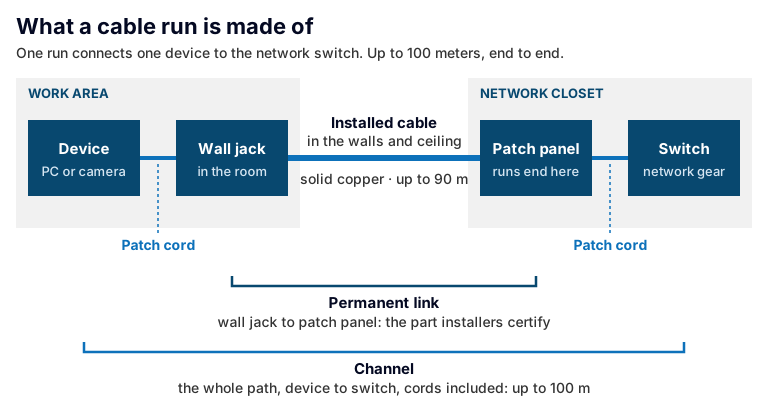
When a device won’t connect, the patch cords are the easiest part of the run to swap, so they’re usually the first thing to check.
A “run” is the path from one device to the network switch, and it has more parts than most people expect:
- A patch cord from the device, such as a computer, phone or camera, to the jack in the wall.
- The wall jack itself.
- The installed cable, which goes through the wall and ceiling to the network closet. It can be up to 90 meters long.
- A patch panel in the closet, where every installed cable ends.
- A second patch cord from the patch panel to the switch.
The installed cable uses solid copper conductors, one solid wire each, which hold their electrical performance over distance and stay where they’re put. Patch cords have a choice. Factory-made cords often use stranded conductors, each made of many fine wires, because they flex more easily with repeated handling. Cords made on site are commonly cut from the same solid cable that’s in the walls. Either works, as long as the cord and its plugs are rated for the category. Stranded wire does lose a little more signal per meter, which is one reason the standards keep cords short and give the installed cable most of the 100 meters.
Test reports have names for these pieces. The installed part, from wall jack to patch panel, is the permanent link. The whole path, cords included, is the channel. The permanent link is what installers usually certify, because cords get swapped over the years and the cable in the walls doesn’t.
One more thing follows from all those parts: the jack, panel and cords have to be rated to the same category as the cable, because the rating applies to the whole run, not just the cable.
How to read a cable jacket
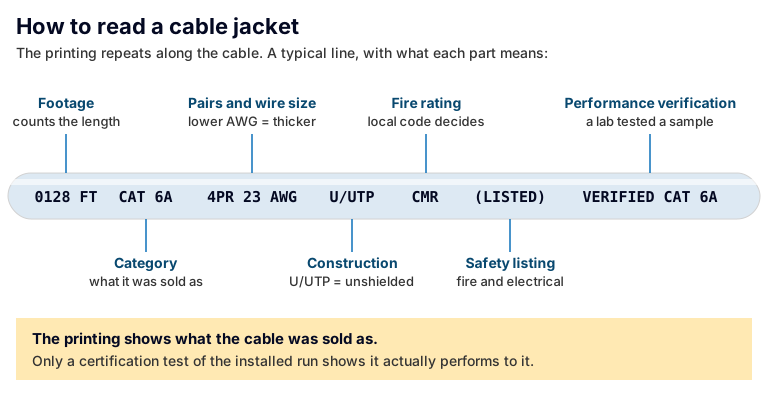
The printing repeats every couple of feet, so a short stretch of cable visible above one ceiling tile is usually enough to read it.
Wherever installed cable is visible, above a ceiling tile or in the network closet, its jacket carries a line of printing that repeats along its length. It looks like code, but it’s mostly plain facts:
- The category, such as CAT 6 or CAT 6A.
- Pair count and conductor size, such as “4PR 23 AWG.” A smaller AWG number means thicker copper.
- Construction, such as U/UTP for unshielded cable or F/UTP for cable with a foil shield around the pairs.
- A fire rating. Cable is rated for where it can be installed, and local code decides which rating a space requires.
- A safety listing from a recognized testing lab, and sometimes a separate performance verification mark for the category.
- Footage markers that count the length, and the manufacturer’s name or code.
The two lab marks are easy to confuse. A safety listing covers fire and electrical safety. A performance verification means a lab tested samples of that cable against its category, and not every cable has one. Neither says anything about your installed run. The printing tells you what the cable was sold as. Whether the run performs to it is a question only testing answers.
What testing proves, and what it doesn’t
Cable is tested at three levels, and each answers a different question.
- Is it wired correctly? A basic verification tester checks that each wire connects end to end, in the right order, with no breaks or shorts. It doesn’t measure performance, so a run can pass and still fail to carry the speed it was bought for.
- Will it carry a given speed? A qualification test checks whether a run can support a particular network speed. It’s useful for troubleshooting and for sizing up existing cable, but it doesn’t measure the run against a category.
- Does it meet its category? A certification test measures the run across its category’s full frequency range, against the limits in the standard, including signal loss and crosstalk between pairs. It records a pass or fail for every run.
The certification report is the evidence that each run met its category on the day it was tested. File it with your building records. If you change vendors or end up switching IT providers, it’s one of the first things the new team will want to see.
What’s probably already in your walls
Most buildings don’t have one cabling system. They have layers. Cable gets pulled in different decades, by different companies, for different jobs: the phone system, the first network, the camera upgrade, the suite that was remodeled. Some runs are labeled and documented and some aren’t. Some are dead, left in the ceiling after the equipment they served was removed.
Cat5e is likely to be in the mix. There’s so much of it installed that in 2016 the Ethernet standard added 2.5 and 5 Gbps speeds specifically so existing Cat5e and Cat6 could carry more without being replaced. Cat5e carries 1 Gbps to the full 100 meters, and 2.5 Gbps equipment is designed to run on it. Whether that’s enough depends on what’s plugged in. If you’re planning new runs, see our guide on whether Cat6 or Cat6a is the better choice.
Between closets, it may be fiber or copper. Many small offices have a single network closet, so there’s nothing to link. Where a building has more than one, the links between closets, floors and buildings carry traffic from many runs at once. Newer and larger buildings usually use fiber for them, and fiber is the only choice once a link is longer than copper allows. Older buildings, or closets close together, often use copper instead.
How to find out what you have:
- Read the jacket printing wherever the cable is visible.
- Check the labels on wall jacks and patch panels, and whether they match each other.
- Ask for the certification reports and any drawings or cable schedules.
- Ask whoever installed or maintains it.
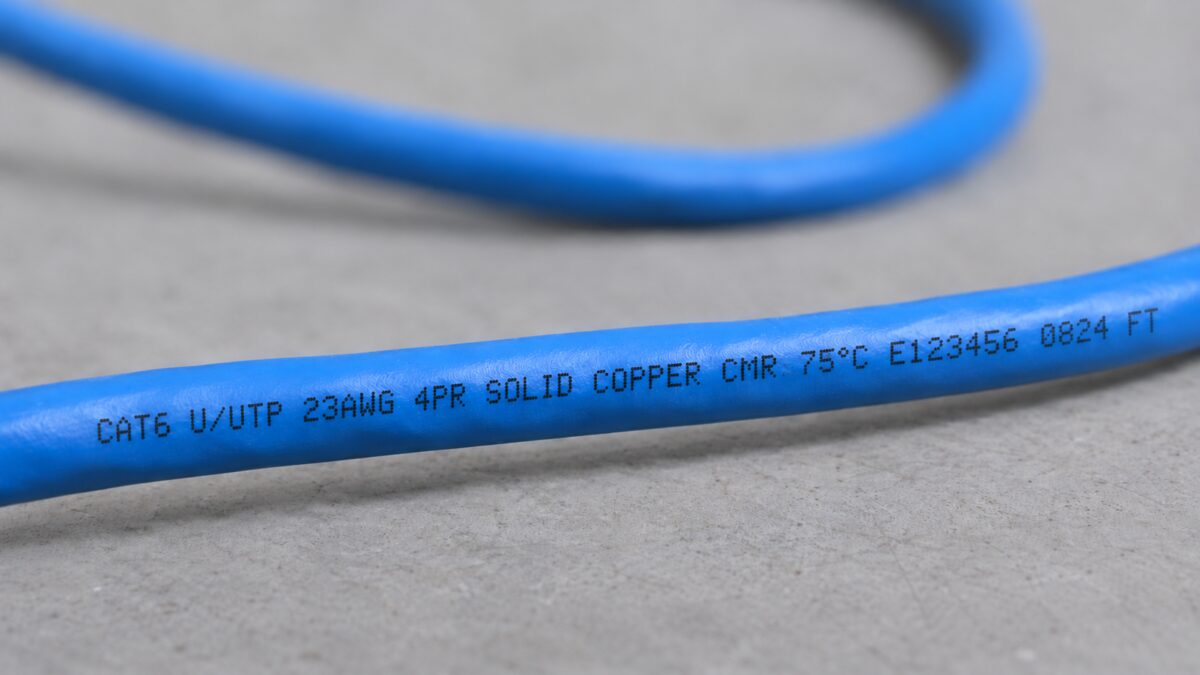
A few inches of jacket print tells you the category, the wire size and whether the conductors are solid copper, which is what you want for cable in the walls.
If none of that turns anything up, that’s the answer: the cabling is undocumented, and the next project starts by finding out what’s there.
When your cabling deserves a fresh look
Cable needs very little maintenance. The records are what go stale. These are the moments to check both:
- A move, remodel or new suite. Settle the cabling before walls and ceilings close.
- New access points, cameras or door readers, especially ones powered over the cable.
- Dropouts or slow connections that new equipment didn’t fix.
- Cabling nobody has records for.
- A change of IT or security provider.
When a new provider takes on a building, an assessment of the existing cabling is usually the first step. It’s how they find out what’s there before anything is bought.
Questions worth asking about the cabling you have
- What category is our existing cabling, and has it ever been certified? Who has the reports?
- Is there a record of what runs where, from each wall jack to its patch panel port?
- Which runs carry cameras, door access or anything else that isn’t IT?
- Is any of the cable in our ceilings abandoned, and does anyone know which?
- When we add or move people, who updates the records?
- What are we adding in the next few years, such as cameras, door access or more access points, and can the cabling we have carry it?
- If any part of this goes to another trade, who holds that contract, you or the company quoting the job?
Frequently asked questions
What’s the difference between a network cable and an Ethernet cable?
“Network cable” covers any cable that carries network traffic, including fiber and coax. “Ethernet cable” usually means the copper twisted-pair kind, with the plug that clicks into a wall jack, rated by category: Cat5e, Cat6, Cat6a and so on. Every Ethernet cable is a network cable, but plenty of network cable isn’t Ethernet cable.
What is a cabling contractor?
A cabling contractor installs, terminates and tests the low-voltage cable a building’s systems run on: data, phones, cameras, access control and AV. Some only do the cable and leave the equipment to other companies. A systems integrator also installs and supports the systems that run on that cable, so one company owns the result.
Can you tell a cable’s category by looking at it?
Only by reading the printing on the jacket. Thickness doesn’t tell you, and color doesn’t tell you either: the same category comes in many colors. Even the printing only shows what the cable was sold as. A certification report is what shows the installed run meets its category.
Our office is mostly wireless. Do we still need cabling?
Yes. Every Wi-Fi access point is cabled back to the network, and many also draw their power over that same cable. Adding wireless coverage usually means more cable runs to the ceiling, not fewer. Wireless replaces the cord to the laptop. It doesn’t replace the cable behind the access point.
Why is a copper run limited to 100 meters?
Because that’s the distance the standards are built around. The cabling standards set their performance limits for a channel of up to 100 meters, and Ethernet over twisted pair is specified for that same length. Past that length, the standards make no promise about how clean the signal is. Longer distances are handled with fiber or by adding another network closet closer to the devices.
The bottom line
The cable in your walls is the part of your network that stays. The equipment at each end will change; the cable usually won’t. Knowing what the labels mean, what a test report proves and which records you should have makes every later project easier to plan, from a new camera to a new IT provider.
Trouble tends to start when work is handed from one company to the next until nobody owns the result. Bestegra designs, implements and supports structured cabling and connectivity and the security and IT systems that depend on it, and the crew running cable and installing devices works for Bestegra. If you’re not sure what’s in your walls, talk to us. An assessment of your cabling is where we’d start.
References
The standards behind the figures in this article:
- ANSI/TIA-568 series, telecommunications cabling standards, including ANSI/TIA-568.2-E (2024) for copper cabling. Published by TIA’s TR-42 Telecommunications Cabling Systems committee.
- TIA TSB-155, guidance for running 10-gigabit Ethernet over Category 6 cabling (the 37–55 meter range).
- ISO/IEC 11801-1:2017, Generic cabling for customer premises, the international counterpart, which also defines Cat7.
- IEEE 802.3, IEEE Standard for Ethernet, which defines Ethernet speeds over twisted-pair copper, including 2.5 and 5 Gbps (added as IEEE 802.3bz-2016).