
Somewhere on your next network quote there’s a line that says “Cat6” or “Cat6a.” Maybe you’re adding Wi-Fi access points, replacing old cameras or moving into a new suite, and whoever is quoting the job asks which one you want. It sounds like a detail for the installer. It isn’t, because the cable goes into the walls and stays there long after the equipment it was bought for is gone.
This guide covers Cat6 vs. Cat6a in plain terms: what each one is, how they’re built differently, what each means for the access points, cameras and door hardware you’re buying, and where Cat7 and Cat8 fit. The short version on those two: Cat7 rarely belongs in a US office, and Cat8 belongs in a data center.
Cat6 vs. Cat6a at a glance
Here’s how the four categories you’re most likely to see on a quote compare. If the terms are new, the next section explains them.
What the numbers mean
“Cat” is short for category, a performance grade for twisted-pair copper cable, the cable behind nearly every network jack in an office. Inside the jacket are four pairs of copper wires, twisted to cancel interference. In the US, the categories are defined in ANSI/TIA-568, a standard published by the Telecommunications Industry Association (TIA), and each one sets limits on how cleanly the cable carries a signal.
MHz is the cable’s rated frequency, the range it’s specified and tested to: 250 MHz for Cat6, 500 MHz for Cat6a. Think of it as the width of a road: the wider it is, the more traffic moves at once without collisions. It isn’t speed. Speed, measured in gigabits per second (Gbps), is set by the equipment at each end. The rating decides which speeds a cable can carry, and how far.
Reach is how far a cable can carry a given speed. A standard run can be up to 100 meters (about 328 feet), counting the patch cords at each end. At 1 Gbps, Cat5e, Cat6 and Cat6a all reach the full 100 meters. At 10 Gbps, Cat6a still does, but Cat6 drops to roughly 37 to 55 meters, depending on how the cable is bundled and installed. One network closet usually serves a whole floor or building, so the runs to the far corners, ceiling access points and upper floors are the long ones, and those runs decide whether Cat6 is enough.
What actually changes between Cat6 and Cat6a
Cat6 and Cat6a look almost the same, plug into the same jack and both carry the 1 Gbps connections most desks use today without trouble. The differences show up when the speed, the distance or the load goes up.
Speed over distance. Cat6a carries 10 Gbps over the full 100 meters; Cat6 only over roughly 37 to 55. On the long runs in a building, Cat6 tops out at a lower speed.
How Cat6 and Cat6a are built differently
From the outside, the two look alike: four twisted pairs of copper inside a plastic jacket, ending in the same RJ45 jack. The differences are inside, and most of them come down to crosstalk. That’s signal leaking from one pair to another inside the cable, or from one cable into the cables bundled next to it, which is called alien crosstalk. At higher speeds, alien crosstalk becomes the limit, and Cat6a has a tighter alien crosstalk requirement than Cat6. Manufacturers meet it in two main ways:
- Spacing. Unshielded Cat6a (labeled U/UTP) uses an internal plastic separator and extra insulation to keep pairs apart, inside a thicker jacket that also keeps neighboring cables farther away.
- Shielding. Shielded Cat6a (often labeled F/UTP) wraps all four pairs in a layer of foil instead. It can be slimmer than unshielded Cat6a, but the shield has to be grounded properly to do its job.
Shielding isn’t required for either category. Both come in shielded and unshielded versions, and shielded cable is usually chosen for places with heavy electrical interference, such as near large motors or industrial equipment.
The visible result is size. A typical Cat6 cable is about 6 millimeters (roughly a quarter inch) across. Unshielded Cat6a is often 7 to 9 millimeters, with shielded versions usually in between. Much of that extra bulk comes from controlling alien crosstalk. It also makes Cat6a stiffer and harder to bend. It fills ceilings, pathways and racks faster, and it takes more care to terminate well. That isn’t a reason to avoid it, but it is a reason the installer has to plan for it.
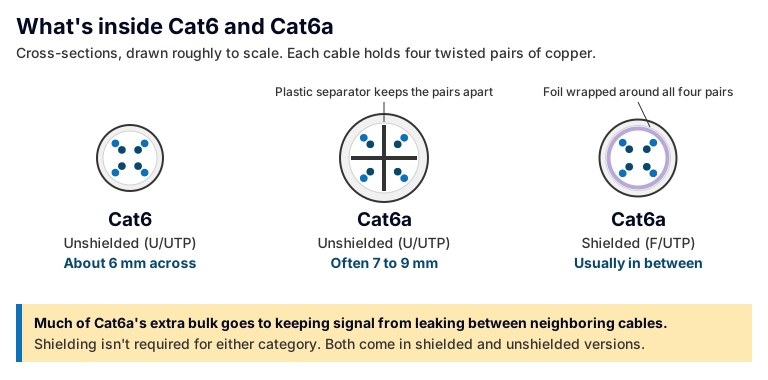
Both carry four twisted pairs of copper. What Cat6a adds is spacing or shielding to keep signal from leaking between cables.
Is Cat6a worth the extra cost? Cat6a cable and parts cost more, and installing them takes longer. But the cable is only part of what a run costs. Labor, ceiling and wall access, and disruption to your space are part of it too, and you pay for all of them again if the cable ever has to be pulled. If there’s a real chance you’d need to replace this cable during its life, that’s the comparison worth making.
Why it matters now: Wi-Fi, PoE and everything on the wall
Not long ago, the cable to a desk carried one computer, and Cat6 had room to spare. What’s changed is what sits at the other end of the cable.
Wi-Fi access points. Newer access points, including Wi-Fi 7 models, can move more data than a 1 Gbps connection carries, and many connect to the network at 2.5 Gbps or faster. The standard for those in-between speeds (2.5 and 5 Gbps) was written to run on existing Cat5e and Cat6 at the full 100 meters, so well-installed Cat6 often handles them. A full-length run at 10 Gbps is where Cat6a’s extra reach matters.
Power over the same cable. With Power over Ethernet (PoE), one cable carries both data and power, so access points, cameras, door readers and phones don’t need an outlet nearby. The newest PoE standard delivers up to 90 watts from the switch, using all four pairs of wires in the cable. More power means more heat, and in a tight bundle that heat builds up. TIA’s guidance on carrying power over cabling covers bundle sizes and recommends Category 6A or better for new PoE installations.
Cameras and doors. Security systems increasingly run on the same cabling as everything else. Network cameras send video across the network around the clock, and an access control system depends on readers and controllers that are often powered over the cable. If you’re replacing older cameras or adding badge readers, the cable decides how much those devices can do.
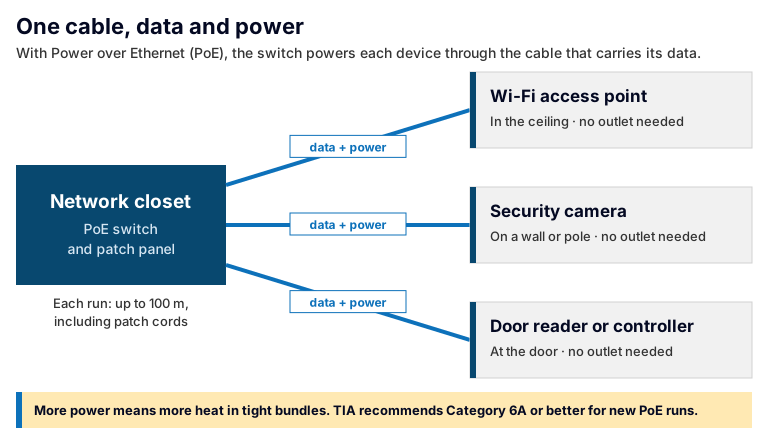
Every device on a PoE run gets its power from the switch, so the cable carries a heat load as well as data.
How long does cabling last?
There’s no expiration date. TIA’s cabling standards don’t set an end-of-life for installed cable; the people who wrote them aimed for it to last more than ten years. That’s a design goal, not a date when cable stops working. Some manufacturers warrant installed systems for as long as 25 years, if the system is installed and tested to their requirements. In practice, cable is usually retired because it can’t carry what new equipment needs, or because a renovation damages or reroutes it. Switches, access points and cameras are replaced far more often, so the cable you install today will probably carry several generations of equipment.
Nobody knows exactly what their network will need in ten years. But most businesses know what’s coming in the next few: more people, more access points, more cameras, another suite. Those plans are the best guide to which cable to run. A practical rule:
- Cat6a is the safer choice when a run feeds Wi-Fi access points or high-power PoE devices, when you might want 10 Gbps on it, or when it’s long or hard to reach later, such as runs in finished ceilings or between floors. It leaves headroom for equipment you haven’t bought yet.
- Cat6 is often enough for a short run to a desk phone, printer or workstation where nothing is likely to change, or for adding a few drops to a building that’s already wired with Cat6.
Most buildings end up with both, and that’s fine. What matters is that each run is chosen for what it will carry, and that someone wrote down which is which.
What about Cat7?
Cat7 shows up in search results and online listings as the next step past Cat6a. For a US office, it usually isn’t.
It isn’t a TIA category. Cat7 is defined in the international ISO/IEC 11801 standard and rated to 600 MHz. The TIA, whose standard US commercial cabling is designed and tested to, doesn’t recognize it.
Its full performance depends on different connectors. Cat7 was designed around connectors other than the standard RJ45 jack that every switch, access point and camera uses. Terminate it on ordinary RJ45 jacks, as most “Cat7” sold online is, and the run can’t perform beyond the rating of those jacks. You’ve paid for a heavier cable without getting a higher-rated connection.
If a quote lists Cat7, ask what standard the finished runs will be tested and certified to. For most offices, the answer you want to hear is Cat6a.
What about Cat8?
Cat8 is a real TIA category, and on paper it’s the fastest: 2,000 MHz, built for 25 and 40 Gbps. But it was built for one job, short links between servers and switches in a data center. A Cat8 run can be at most 30 meters long with only two connections, compared with 100 meters and up to four connections for Cat6 and Cat6a. That’s shorter than most runs to an office, a ceiling access point or a camera, and the devices at the far end can’t use those speeds anyway.
So the higher number isn’t better for office drops. Cat8 is a question for the server room, if you have one. For the rest of the building, the decision is Cat6 vs. Cat6a.
The cable is only one part of the run
A category rating belongs to the whole run, not just the cable. A run includes the jack in the wall, the patch panel in the network closet and the patch cords at each end. Terminate a Cat6a cable on Cat6 jacks, or connect it with patch cords that aren’t rated for Cat6a, and the run may not meet Cat6a performance.
Two things separate a run that performs as rated from one that doesn’t. First, the parts match the category from end to end. Second, the run gets tested. A certified run has been tested with a cable certification tester against its category, and you get the results for every run. That report shows each run met its category when it was tested, and it’s the record the next vendor will ask for. The same goes for the cable itself: the category standards call for copper conductors, and cheap copper-clad aluminum cable doesn’t meet them.
This is also where hand-offs between vendors cause the most trouble. The cabling contractor, the network vendor and the camera or door company often aren’t the same company. When an access point that should connect at multi-gig speeds only connects at 1 Gbps, each vendor points at someone else’s part, and the cable is the hardest thing to check once the ceiling tiles are back in place. That’s the case for structured cabling coming from the same company that installs what runs on it, or from a systems integrator who owns the whole result.
Questions worth asking before you approve a cabling quote
These questions work whichever category you choose:
- Here’s what we’re planning over the next few years: more people, more cameras or access points, maybe more space. Will this cabling handle that, or would we be pulling new cable?
- Is the whole run rated to the category, including the jacks, patch panels and patch cords, or just the cable?
- Will every run be tested and certified, and do we get the results?
- If only some runs are being replaced, how will the old and new runs be labeled and documented? Those records are what you’ll want if you ever end up switching IT providers.
- Is the cable jacket rated for where it runs? Local code decides what’s required in ceilings and between floors.
- If any part of this goes to another trade, who holds that contract, you or the company quoting the job?
Frequently asked questions
Can a Cat6 cable carry PoE?
Yes. Every Power over Ethernet standard, including the newest high-power version, runs on Cat5e or better, so Cat6 carries PoE. The issue is heat. When many cables carrying high power are bundled tightly, the temperature inside the bundle rises. For new runs that will carry high-power PoE, TIA guidance recommends Category 6A or better and smaller bundles.
What cabling is required for Wi-Fi 7?
No single cable is required, but the cable affects what the access point can do. Many Wi-Fi 7 access points connect at 2.5 or 5 Gbps, which Cat6 handles at full distance. Some connect at 10 Gbps, which needs Cat6a for a full-length run. They also draw more power than older access points, so high-power PoE and bundle heat matter too.
What is the average lifespan of Cat6 cable in a fixed location?
No standard sets an expiration date. TIA’s cabling standards were written with a life of more than ten years in mind, and some manufacturers warrant installed systems for 25 years. In practice, cable in a wall or ceiling is usually replaced because it can’t carry what new equipment needs, or because the space is remodeled, not because it wears out.
Is Cat8 needed for a business network?
For almost every office, no. Cat8 is built for 25 and 40 Gbps links of 30 meters or less, mostly between servers and switches in a data center. Runs to desks, access points and cameras are usually longer than that, and the devices on them can’t use those speeds. For those runs, the choice is Cat6 or Cat6a.
Can you mix Cat6 and Cat6a on the same network?
Yes. Different runs can be different categories, and many buildings have both. What doesn’t mix well is parts within a single run: a Cat6a cable with Cat6 jacks or patch cords may not meet Cat6a performance. Keep each run consistent from end to end, and label and document which category each one is.
Will Cat6a make our internet faster?
Usually not. Your internet speed is set by the service coming into the building, not by the cable to your desk. Cat6a speeds up what happens inside the building: access points, file transfers, camera recording and the links between switches. If the internet feels slow, look at the service and the Wi-Fi before you look at the cabling.
The bottom line
If a run will carry Wi-Fi access points, high-power PoE or 10 Gbps, or it’ll be hard to reach later, Cat6a is the safer choice. If it’s a short run to a device that won’t change, Cat6 is often enough. Cat7 rarely belongs in a US office, and Cat8 belongs in the server room. Whatever the category, ask for every part of the run to match, and for every run to be tested.
Bestegra designs, implements and supports structured cabling and network services along with the security and IT systems that run on them, and the crew running cable and installing devices works for Bestegra. If you’re planning an upgrade, a refresh or a move, get in touch and tell us what your network needs to carry.
References
The standards behind the figures in this article:
- ANSI/TIA-568 series, telecommunications cabling standards, which define Categories 5e, 6, 6A and 8. Published by the TIA’s TR-42 Telecommunications Cabling Systems committee.
- TIA TSB-155, guidance for running 10GBASE-T over Category 6 cabling (the 37–55 meter range).
- TIA TSB-184-A (2017), Guidelines for Supporting Power Delivery Over Balanced Twisted-Pair Cabling.
- ISO/IEC 11801-1:2017, Generic cabling for customer premises, the international standard that defines Cat7.
- IEEE 802.3, the Ethernet standard, including the amendments 802.3bz-2016 (2.5GBASE-T and 5GBASE-T), 802.3bq-2016 (25GBASE-T and 40GBASE-T) and 802.3bt-2018 (four-pair Power over Ethernet). The amendments have since been folded into the main IEEE 802.3 standard.