Most people shopping for access control systems for business are in one of three spots. The keys have gotten out of hand and nobody is sure how many copies exist. There’s already a system on the doors, installed by someone who’s gone, and nobody trusts it. Or there’s a quote on the desk that might as well be written in a foreign language.
This guide is for all three. It explains what you’re actually buying, how the choices differ in ways that matter to your business, and the part every sales page skips: everything that has to happen between the software and the door. It ends with a short list of questions to ask before you sign anything. You shouldn’t have to become an expert to make this decision, but you should know what to ask.
What an access control system does for a business
Set the product names aside and a commercial access control system has four parts:
- A reader at the door. It’s the small panel you hold a card or phone up to, or type a code into.
- A lock that releases when the reader approves you.
- A controller, usually a small box in a closet, that makes the yes-or-no decision for each door.
- Software where you decide who gets through which door, and when.
That’s the whole system. What it does for the business comes down to four things.
- Nobody changes the locks. When someone leaves the company, you turn off their access in the software. The lock stays the same, and so does everyone else’s card.
- You have a record. Every time a door opens, the system notes who opened it and when. If something goes missing, you can see who was in the building at 9:40 on Tuesday.
- You can manage doors from anywhere. Let the cleaning crew in at 7, lock the warehouse at 6, or open the front door for a delivery from your phone.
- The alarm stops being everyone’s problem. When the access system is connected to your alarm, holding your card to the reader turns the alarm off for that area, and the last person out turns it back on. There’s no shared alarm code to remember or hand out, no false alarm from a mistyped code at 6 a.m., and the alarm log shows a name instead of a number. This only works when both systems are designed together, which is why companies selling one or the other rarely mention it.
Everything else a vendor shows you is a variation on those four.
The three types of access control systems
Ask three people what the three types of access control are and you’ll get two different lists. One describes how the system is put together. The other describes how it decides who gets in. You’ll run into both while you shop, so here’s each.
How the system is built
- Standalone. One door, one keypad or reader, no connection to anything else. Codes are programmed at the door itself. Fine for a supply closet or a single back entrance, but it won’t grow with you and it doesn’t keep a useful record.
- Networked, on-site. The controllers at your doors talk to a server in your building. You own that server, the software, and the job of keeping it running.
- Cloud-managed. The controllers are still at your doors, but the software runs on the vendor’s servers and you reach it through a web browser or an app. You pay a subscription, and the vendor handles the updates.
How permissions are decided
The textbook names are discretionary, mandatory, and role-based, and if you look them up you’ll find pages of theory. For nearly every business, the practical version is role-based: office staff get the front door and the office, warehouse staff get the warehouse and the dock, managers get both. Access is set up by job rather than by person, so a new hire is given a role instead of having their doors picked one at a time.
Credential types, and what each one asks of your people
A credential is whatever a person presents at the door: a card, a code, a phone, or a fingerprint. Door access control systems for business usually support more than one, and the right choice depends less on the technology than on how your people will actually use it.
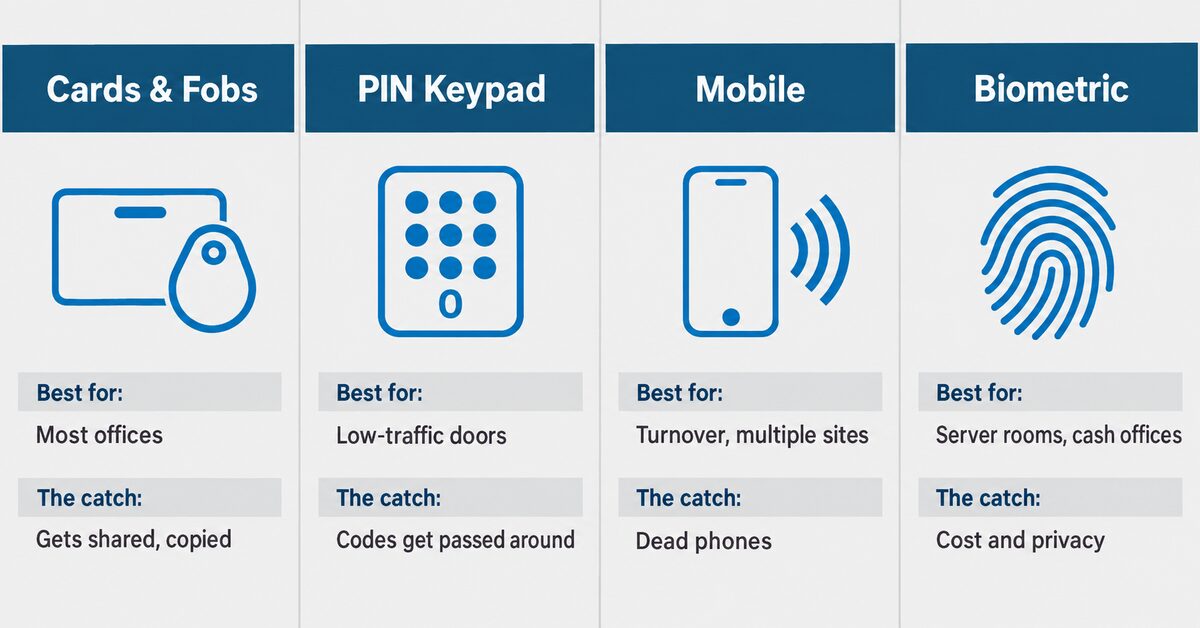
Four ways to open a door — and what each one asks of your people.
Cards and fobs. The default for most offices. They’re cheap to hand out, easy to understand, and they work when a phone is dead. The catch is that they get shared. A fob left on a desk opens the door for whoever picks it up, and older card types can be copied with equipment that costs less than lunch. Ask what kind of card the reader uses before you accept “cards” as an answer.
PIN keypads. Nothing to carry and nothing to lose, which makes them a good fit for low-traffic doors and tight budgets. The catch is that codes get shared, and once a code is out, changing it means telling everyone the new one. A keypad that gives each person their own code is a different product from one with a single code for the door, so know which one is being quoted.
Mobile credentials. The phone is the key. This works well for businesses with turnover, more than one location, or contractors who need access for a week. Adding and removing people takes seconds and can be done from anywhere. The catch is dead phones, and staff who don’t want a company app on a personal device. Plan a backup credential for the people who need one.
Biometrics. A fingerprint or a face. It can’t be shared and can’t be forgotten, which makes it right for a server room or a cash office and rarely for the front door. The catch is cost, readers that struggle with gloves or wet hands, and the conversation you’ll need to have with your staff about privacy before it goes in.
Most businesses end up with two credentials: a primary one for everyone and a backup. Decide that before the quote, not after the install.
Cloud-managed vs. on-site: who’s actually running it
This choice is usually presented as a feature comparison. It’s really a question of ownership.
Cloud-managed means the vendor runs the software, keeps it updated, and keeps it available. You log in. You pay monthly or yearly, per door or per user. The trade-off is that your doors now depend on a subscription and an account, so you need to know exactly who controls that account. If the person who set it up leaves the company, can you still get in? If you stop paying, do your doors keep working? If you switch vendors, do you get your data?
On-site means the software runs on a server in your building. There’s no subscription and no dependence on someone else’s service, and the data stays with you. The trade-off is that it’s yours to maintain: the updates, the backups, and the day the hard drive fails. If you have an IT team or an IT provider who will take responsibility for it, on-site can be the right answer. If nobody owns it, it becomes the thing that quietly stops getting updated.
Either way, the question underneath is who owns the system and its data once it’s installed. That deserves its own discussion, and we’ll cover it in a separate post on who owns your access control data.
What sales pages leave out: everything between the software and the door
Read any vendor’s page and the system seems to consist of a reader and an app. That’s the part you see. Here’s what has to exist behind it.
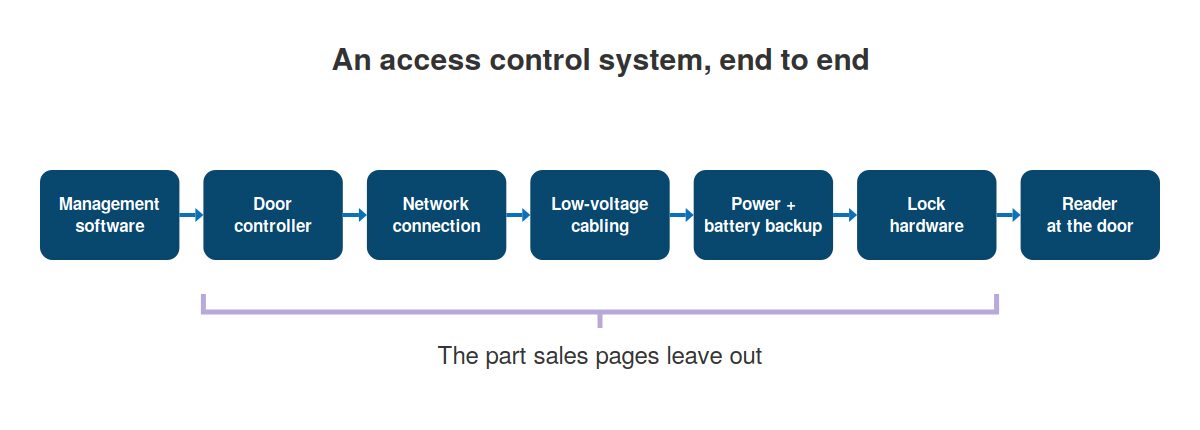
The software is the part you see. Everything else decides whether it works.
Lock hardware that matches the door. Electric locks come in a few forms — strikes that release the door frame, magnetic locks that hold the door shut, handles that lock and unlock electrically — and each fits certain doors and not others. A door that closes on its own, a door that’s warped, a glass storefront door, and a steel fire door are four different problems. The lock has to be chosen door by door, and the wrong choice is the most common reason a new system is unreliable from day one.
The fail-safe or fail-secure decision. When power is lost, does the door unlock (fail-safe) or stay locked (fail-secure)? Fire and building codes have rules about how people get out of a building, and for certain doors those rules make the decision for you. It’s settled during design, not discovered later by the fire marshal.
Cabling to every door. Each reader, lock, and door sensor needs a cable run back to the controller. In an existing building that means going through ceilings and walls. A crew that does structured cabling properly is the difference between a system that works and one that develops random faults nobody can find.
Power. Locks and controllers need power supplies, and the ones that matter need battery backup. Where those supplies go, and what they’re connected to, is a design decision.
A network connection that someone chose on purpose. Networked and cloud systems need to reach the controller over your network. Too often the controller gets plugged into whatever network jack was open, and your door system ends up sharing a network with your accounting software because nobody decided otherwise. Your IT team or IT provider should know where it lives before it’s installed.
This is where access control projects go wrong, and it almost never shows up in the quote. The software vendor sells the platform. Somebody else runs the cable. An electrician wires the lock. IT finds the controller on the network a month later. The work gets handed from one company to the next until nobody owns the result, and when a door sticks at 6 a.m., every one of them can point at another.
What drives the cost
Any number you read online is a guess about a building the writer has never seen. What’s useful is knowing what moves the price, because it’s rarely the software.
- How many doors. Every door is hardware, cabling, and labor. The software cost per door is small by comparison.
- The condition of your doors. Frames that need reinforcement, doors that don’t close on their own, glass doors that need a particular lock. This is the line item that surprises people.
- Credential type. Keypads are the cheapest readers and biometric readers are the most expensive. Mobile credentials shift cost from hardware to subscription.
- Cloud subscription or on-site. One is a monthly bill that doesn’t end; the other is a bigger number now plus the job of maintaining it.
- Cabling distance and building construction. A drop ceiling and a nearby closet is one job. Concrete walls, plaster, or a controller three floors away is another.
- What it connects to. Tying access into cameras, the alarm, or a visitor sign-in system adds work. Sometimes that’s the whole point. Decide it up front.
- Undoing what’s already there. If a previous install left cabling nobody can trace or locks that don’t fit the doors, part of the budget goes to cleaning that up.
When a quote comes in low, look at the door hardware and cabling lines. That’s usually where something was assumed instead of checked.
Questions to ask before you sign
You don’t need to evaluate the technology yourself. You need to find out who is responsible for what. A systems integrator should be able to answer every one of these without checking with someone else.
- If any part of this goes to another trade, who holds that contract — you or me? The cabling, the locks, the network. If the answer is a chain of companies, you’ll be the one coordinating them when something fails.
- Who owns the account and the data if we stop paying? This matters most for cloud systems. Get it in writing.
- What does each door do when the power goes out? When the internet goes out? The answer should be specific to each door, and it should match what the fire code requires.
- Who’s responsible for the network this runs on? If the answer is “your IT people” and your IT people haven’t heard about it yet, stop.
- What did you find at my doors that will change the quote? If nobody has looked at your doors, the quote is a guess.
- How do I add a door or a second location later? The answer tells you whether the system was designed for your business or for the sale.
Signs your business has outgrown keys
Not every business needs this. Here’s when keys stop working.
- Staff turnover happens a few times a year, and every departure raises the same question: who still has a key?
- Cleaners, contractors, or delivery drivers need to get in when nobody’s there.
- There’s more than one location, and somebody drives between them with a ring of keys.
- Insurance, a client contract, or a compliance requirement asks how you control access, and the honest answer is “a lock.”
- There’s a master key, and nobody is sure how many copies exist.
It’s a familiar pattern for growing businesses in the Denver area: a second suite, a warehouse next door, a night shift added in a good year. The keys that worked fine for ten people don’t work for forty.
Frequently asked questions
What is the best access control system for a small business?
The one that matches your doors, your people, and whoever will manage it. For most small businesses that’s a cloud-managed system with card or mobile credentials, a fallback credential, and battery-backed power at every door. The brand matters less than whether one company is responsible for the whole install.
What are the three main types of access control systems?
It depends on who’s counting. Systems are usually grouped by how they’re built: standalone (one door, no network), networked on-site (controllers plus a server in your building), and cloud-managed (controllers on-site, software hosted by the vendor). They can also be grouped by how permissions are decided, where most businesses end up with role-based access: doors are assigned by job rather than by person.
How much does an access control system cost for a business?
It depends more on your doors than on the software. Door count, the condition of the doors and frames, credential type, cabling distance, and whether you choose a subscription or an on-site server are the main drivers. Door hardware and cabling are where quotes most often miss.
Do access control systems work if the internet goes down?
Well-designed systems keep working at the door: the controller stores permissions locally and keeps making decisions. What you lose is remote management and live logging until the connection returns. Ask specifically how each door behaves during an internet outage and a power outage, because the answers differ.
Can access control work with our existing doors and locks?
Usually, but the door decides, not the software. Each door needs lock hardware that fits its frame and type, and some doors need repair before any lock will hold reliably. An installer who hasn’t looked at your doors can’t answer this question yet.
One company, one result
The reason access control projects fail is rarely the software. It’s the hand-offs: cable run by one company, locks by another, network by a third, and nobody responsible for the door that sticks. At Bestegra the crew running cable and installing devices works for Bestegra, so the design, the cabling, the hardware, and the network are one job with one name on it.
If you’re weighing a system, or you have one that nobody trusts, start with a door walk-through. Twenty minutes at your doors will tell you more than any quote written from a desk. Get in touch and we’ll take a look.